 Pigeon
The HTTP client that stays on your machine
Pigeon is a portable API client and Postman alternative. One file, no installer, no sign-in. Your collections, environments and history live in a folder next to the app — never in someone else's cloud.
Free · No account · Imports your Postman collections
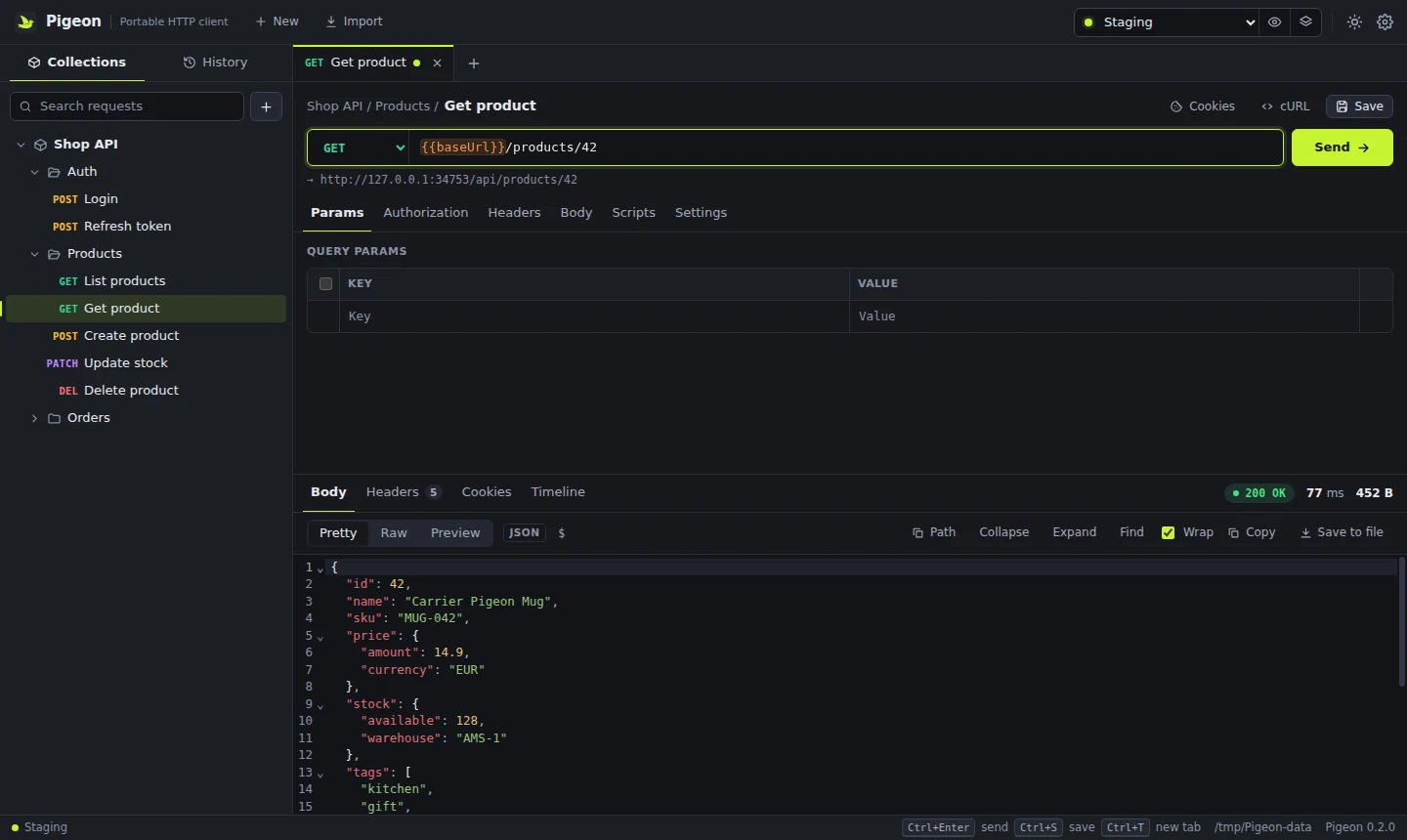
Why developers switch to Pigeon
Testing an API should not need an account, a sync service or an installer with admin rights.
Truly portable
A single .exe that runs without installation or admin rights. Put it on a USB stick or a shared drive, and the Pigeon-data folder travels with it.
Offline and private
No account, no telemetry, no cloud sync. Requests go straight from your computer to your API. Passwords and certificate passphrases are encrypted with Windows DPAPI or the macOS Keychain.
Works with your Postman files
Import Postman collections (v2.0 / v2.1), environments and cURL commands. Pre-request and test scripts written with pm.* keep working.
Git-friendly data
One readable JSON file per collection, so you can commit them, review changes in a pull request and share them with your team.
Everything you need to build and debug APIs
Built for day-to-day REST API work, including the corporate networks where other tools give up.
Requests
- GET, POST, PUT, PATCH, DELETE, HEAD, OPTIONS
- Query params synced with the URL, headers with per-row toggles
- Body: JSON, XML, text, form-urlencoded, multipart with files, binary
- Paste a cURL command straight into the URL bar
Responses
- Pretty, raw and HTML/image preview
- Find in response (Ctrl+F), copy the JSON path at the cursor
- Timing breakdown: DNS, TCP, TLS, first byte, download
- Large responses stay responsive; save the full body to a file
Collections & variables
- Nested folders, drag and drop, tabs restored on restart
- Environments, globals and collection variables with
{{baseUrl}}syntax - Variables highlighted inline: hover to see, edit or add them
- History of every request you sent
Scripts & tests
- Pre-request and post-response scripts with the Postman
pmAPI pm.testand chai-stylepm.expectassertions- Tests and console output right next to the response
- Scripts run sandboxed in a worker with a timeout
Auth & certificates
- Bearer token, Basic, API key, inherited from folder or collection
- Trust the Windows certificate store and your own CA files
- Client certificates (mTLS) per host: PFX/P12 or CRT + KEY
- Inspect a rejected certificate chain and pin it
Proxy & cookies
- System proxy including PAC, or manual HTTP, HTTPS, SOCKS4/5
- Bypass list and per-request proxy override
- Browser-grade cookie jar with a cookie manager
pm.cookiesin scripts
Moving from Postman takes a minute
Pigeon reads the files Postman exports, so you keep your requests, variables and tests.
- Export from PostmanCollection → Export → Collection v2.1, and export your environments.
- Import into PigeonClick Import and pick the files. Folders, auth, bodies and scripts come along.
- Choose an environmentSelect it in the top bar;
{{variables}}resolve as before. - SendPress Ctrl+Enter. Your
pm.testresults appear in the Tests tab.
Download Pigeon 0.2.1-rc.2
Free to download and use. Release notes · SHA-256 checksums
Windows
Portable .exe for Windows 10 and 11 (64-bit). No installation, no admin rights. Data is kept in Pigeon-data next to the file.
macOS
Universal app for Apple Silicon and Intel Macs. Drag Pigeon to Applications. Data is kept in ~/Library/Application Support/Pigeon.
Frequently asked questions
Can't find an answer? Check the release notes.
Is Pigeon free?
Yes. Pigeon is free to download and use for personal and commercial work.
Do I need an account?
No. There is no sign-up, no login and no cloud workspace. Pigeon works fully offline.
Can I import my Postman collections?
Yes. Pigeon imports Postman Collection v2.0 and v2.1, Postman environments and cURL commands, and exports back to Postman v2.1. Scripts using pm.environment, pm.variables, pm.response, pm.test and pm.expect run as they do in Postman.
Where is my data stored?
With the portable Windows app, in the Pigeon-data folder next to the .exe. On macOS, in ~/Library/Application Support/Pigeon. Each collection is a separate JSON file you can back up or commit to git.
Does Pigeon collect any data?
No telemetry. The only request Pigeon makes on its own is an optional check for new versions, which you can turn off in Settings. See the privacy policy for details.
Does it work behind a corporate proxy?
Yes. Pigeon uses the Windows system proxy including PAC files, supports HTTP, HTTPS and SOCKS proxies with authentication, and can trust the Windows certificate store, custom CA certificates and client certificates (mTLS).
Why does Windows show a SmartScreen warning?
The portable .exe is not code-signed yet, so Windows warns the first time you open it. Choose More info, then Run anyway.